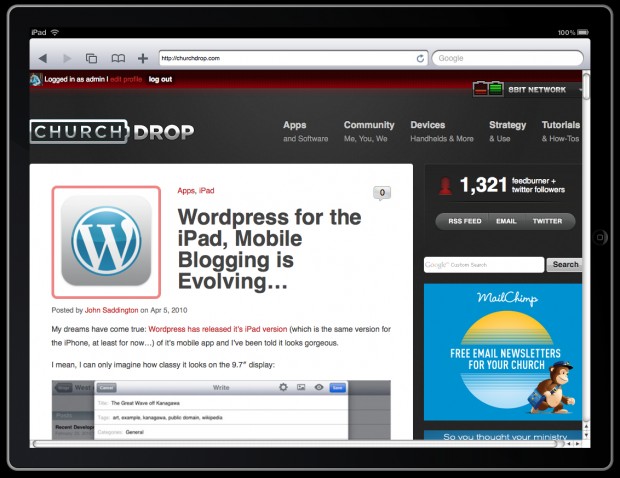
This is a neat little service: iPadPeek.com.
Simply put in your URL to see what your website might look like on the iPad!
I’m not sure how accurate this is but it’s pretty nifty.

ChurchMag Writer
For the Church
The #1 Resource for Church Technology Creativity & New Thinking

This is a neat little service: iPadPeek.com.
Simply put in your URL to see what your website might look like on the iPad!
I’m not sure how accurate this is but it’s pretty nifty.
For the Church
[…] This post was mentioned on Twitter by John Saddington. John Saddington said: Use iPadPeek to View What Your Site Looks Like on iPad – http://bit.ly/duOeOg […]
Social comments and analytics for this post…
This post was mentioned on Twitter by human3rror: Use iPadPeek to View What Your Site Looks Like on iPad – http://bit.ly/duOeOg…
[…] and Development Posted by John Saddington on Apr 25, 2010A little while ago we shared the cool iPad Peek website which shows what your site might look like on an iPad and there’s been tons of other […]







I’ve found that this site doesn’t seem to be accurate. After a quick comparisons on the ipad and then on this sites somet stuff is not identical on the real ipad. Specifically the Facebook fan box. Perhaps the tool is good to see what your site might look like scaled down to fit the ipad screen, not look at specific styling issues etc.
The Standard Theme looks GREAT, at least according to this site.
It’s still early, I bet they’ll perfect it, the iPad is going to be pretty important ( or at least something like it ), as everyone knows, so getting your site right will be a pretty big market I suspect.
It has a few flaws but is an interesting concept anyway. I had build a little iframe tool like this one, but never finished the UI. This one doesn’t announce itself as an iPad via useragent, and renders using the engine for your browser of choice, not specifically the Safari that runs on the iPad. Would be adapt it to remove flash bits, and announce itself as a ‘iPad’ user agent so you’d receive mobile versions, or iPad specific versions of the sites.
Better question, as designers will you be designing an iPad compatible version of your pages, or CSS sheets?
I use the “iphoney” app on my macbook to see what my site will look like on the iPhone. Pretty doggon cool!
Hmmm this service renders flash which of course the iPhad does not.