

Twitter keeps changing as time goes by. Whether that is good or not is usually a very subjective thing amongst the user base.
One of the things that has frustrated me when writing blog posts referencing Twitter, was the tedious process of displaying a referenced tweet inside of a blog post. Normally, I would have to link to it as well as grab a screen shot of the tweet and display the image or use a WordPress plugin like Blackbird Pie.
Well, Twitter has come up with a way for you to now embed tweets in a blog post (or any other kind of web page where you can insert code).
Check this out:
How-To Embed Tweets with Twitter
First the results.
Here is a Tweet from ChurchMag Editor Eric Dye:
Finding a new workflow …
— Eric Dye (@DYECASTING) February 15, 2012
What is so cool about this new feature is that it is interactive. You can follow Eric on Twitter, as well as reply, retweet or favorite the tweet.
So how do you do it?
Very easy.
First, when you’re at somebody’s timeline and see a tweet you want to embed click open:

Click on details:

Click on Embed this tweet:

Grab the code:
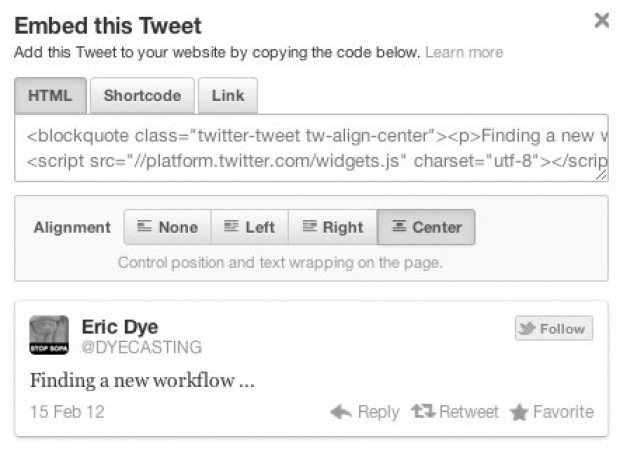
Drop the copy code into your blog post or website and that’s it!
What do you think?
Do you find this useful?

Jay Caruso
I am photographer. I love my wife and kids immensely. I have a personal relationship with Jesus Christ, my Savior. I was an IT Director and Project Manager for 10 years. Now I am a Senior Logistics Analyst at The Home Depot. I love the sport of baseball and the New York Yankees.







Thanks for this Eric! I may have to use this with an upcoming post.
It doesnt look interactive. Maybe its just Chrome, but Ive never seen it actually interactive nor have avatars.