
[Editor’s Note: Be sure to read Designing for the New Look of Facebook Pages!]
If you’ve spent any amount of time on Facebook you’ve probably heard of these things called Fan Pages. Maybe you’ve even created one yourself.
As I’ve perused the Pages devoted to a certain celebrity, or that company or this ministry, one thing has stood out to me: The Facebook Fan Page is one of the most underutilized connection points available today, and this is especially true for ministries.
There are many great examples of the Fan Page, or Page, being used to it’s fullest potential, it’s just that most of these examples lie outside The Church.
I’d like to change that here, with a simple, yet concise series of posts on Facebook Pages.
Ready?
Part 1: The Reason to Have a FB Page, The Basics
Now, you might be asking this question:
I already have a Profile or Group, why do I need a Page?
Good question. Let’s look at each individually to compare.
Profile:
- One line intro: The face of Facebook.
- Pros: Post photo and video content, use Facebook applications, get “friends”, viral*
- Cons: 5,000 friend limit, customization very limited (e.g.- a profile name must be a first and last name, something most organization don’t have)
Group:
- One line intro: Group = Club in “real life”.
- Pros: Gather people with common interests, intimate- great for conversation
- Cons: Sending blast emails/messages limited to groups with less than 5,000 members (If you want to limit your connection ability you would be ok with this, but I don’t know why anyone would want to do that.), limited customization
Page:
- One line intro: Community connection without limits.
- Pros: Unlimited fans (aka- friends/members), customizable, viral*
- Cons: Somewhat more involved than Profiles and Groups
The Page is the right choice for you if your desire is to create a connection on Facebook between your organization and your people already utilizing it or that are going to. Your page is ultimately going to be: A free online community that extends your existing website, providing a reflection of you or your organization.
If you already have a Profile or Group set up for your organization, don’t delete it or take it down- just simply link to it from your existing Facebook properties.
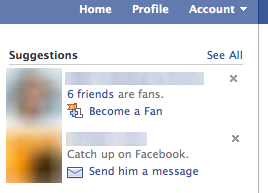 Profiles are viral in the sense that when Joe becomes friends with Brooke, the interaction appears in both of their News Feeds and on their Walls, letting their other friends know that Joe and Brooke are now friends.
If Joe and Brooke become fans on the Local Community Church Page, it appears in these places as well. The same is true if Joe and Brooke join the Local Community Church Group, however there is one feature not available to groups: the suggestion.
The suggestion appears on every Facebook user’s home page, as well as on the Find Friends page, allowing you to “Add people you know as friends and become a fan of public profiles you like.”
Create Your Page:
There are two ways of doing this:
- Logout of Facebook and go to facebook.com/create.php Going this route will create a separate login for the Page (so the Page is NOT linked to your personal account). If you only want to remember one login for Facebook, don’t create the Page this way. Instead use option B. If you do want to use this option, skip option B all together. I should note here as well, that utilizing this option (A) does not allow you to link your Page to Twitter. More on linking to Twitter later.
- Login to Facebook. Go to http://www.facebook.com/pages/create.php. Once you’ve arrived, regardless of which option you’ve gone with, you’re only a few clicks away from the creation of your Page.
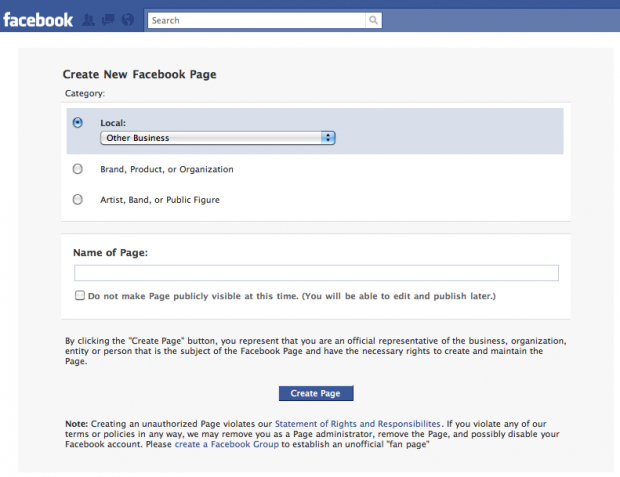
On the Create New Facebook Page, select the category and sub-categories that your Page will fit into. Don’t just jump at the first one that seems to fit. I would encourage you to look through all the sub-categories and find the one that BEST DESCRIBES the Page you are about to create.
Name your Page. Choose your name wisely because it’s permanent. In considering the name for your Page, think about character length. For example: “This is a fan page for everyone that likes fan pages” may be effective, but it’s not as catchy as “Fan Page of Fan Pages”.
After this, there’s an option to make the Page publicly visible right away. I usually elect not to make the Page public, or publish it, at this moment. This allows me to get everything the way I want it before anyone sees the final product- an unveiling of sorts.
If you’ve elected to create your Page as a “separate entity” apart from your personal Profile, you will now need to “signup” for Facebook. Fill out the information, and you’ll be well on your way.
Page Setup: The Basics
Now that you’ve created your Page, you’ll want to get it ready for your fans.
1. Change Picture. This could be your organization’s logo, or it could be a picture of what your Page is about. Either way, be certain that it is highly visible (not overly dark or light) as well as clear and crisp (not pixelated or grainy).
2. Edit Page. This is where you will go to make the majority of the changes to your Page- this is the drivers seat.
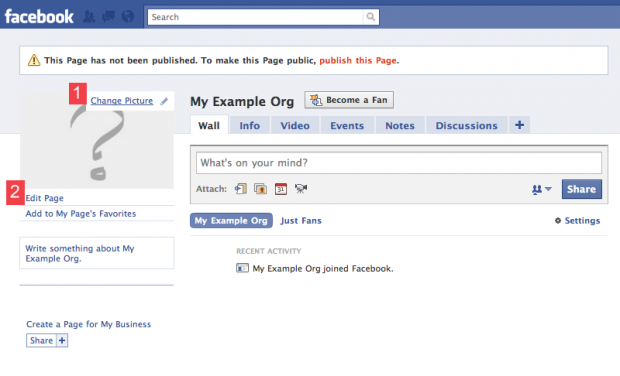
Don’t worry if it’s not perfect. (See, aren’t you glad we didn’t publish it yet?) In part two we’ll get the basic editing down and get on our way to a great Page.
Thoughts on the Facebook Page? Let’s hear ’em!

Eric Dye
Support Lead at Valet, and Proprietor of DYECASTING. Human by day, gamer at night, lover of coffee, and all things spicy.






I’m curious to get some links of some really well done Fan Pages, especially churches and ministries
Here are some for example Nils:
http://www.facebook.com/DriveConference
http://www.facebook.com/CarlosWhittaker
http://www.facebook.com/SoulCityChurch
Thanks for this Nick – I’m lovign all these “how to” type things for ministry usage as I can send them to my pastor.
The more I throw at him the more I pray the process / ideas will actually stick and consequently we end up doing somethign for ourself.
Thanks Stuart. Be careful about burying the guy though! We don’t want him to loathe “another 8bit post”. 😉
That’s true – though I share my blog love around and as you guys are so infectious with what you do it’s going to be hard to loathe anything…
HA! That has to be the most tremendous compliment EVER here on ChurchCrunch! Thanks man!
Once you create a page and have some fans, get a username for your page: http://www.facebook.com/username/
Usernames turn long URLs into memorable ones: http://www.facebook.com/firsthattiesburg
Thanks Brad. We’ll cover this in another part of this series in detail. 🙂
Nick, good start to what I’m sure will be a good series.
It’s great to have the series that start from the ground and build their way up.
I’m sure it’ll be helpful for people.
Thanks DJB! That’s my hope as well bro!
Very helpful article, Nick, thanks.
Need to be careful of the dangers of the potential backlash via social media when things go wrong.
Think: Nestle!
“When social media engagement turns into a nightmare”.
True.
Your post is spot on Steve.
TJ McCue said this in response to what churches should do when it comes to negative feedback in social media at the MISE2010 Q&A session last week:
Word.
A very helpful post!
Glad to man 🙂
And for anyone who thinks I’m up THAT late (timestamp) remember that I’m on Mountain Time [at the beep the time will be 11:32 PM……*beep*]
At Henderson Hills Baptist Church, we’ve got a custom welcome tab on our Facebook page (similar to Soul City Church’s page). You can check it out at http://www.facebook.com/hendersonhills
The content on this tab is managed via a WordPress install and it was put together by our friends at MainStreetOpen.com
I’d recommend them if you’re looking for a feature like that on your Facebook page.
Great Page example Eric!
And thanks for the info…. hmmm WordPress? [licking chops] Do you have any more info on that? If so, please do share!
More details here. I thought I published this a few weeks ago, but I never took it off draft status. Whoops: http://churchtechdump.com/post/471438513/get-a-facebook-app-for-your-church
Eric,
Please tell Doug Dees “HI” for me!
God bless,
Roger
I started working on our church’s fan page last week. Just need a little more coding on our landing page and it will be ready. I went with option B when i created it only because I didn’t know I had another option. Do you think it’s better to go with option A so that the church’s page is not linked to my personal profile? Or is that just a matter of password remembering preference. I guess I’m wondering what the drawbacks are for either option (besides the twitter connection).
I’ve had clients ask me the same question.
The nice part about not having the Page linked to your personal Profile (Option A) is that you, “John Smith” could comment on Page postings et cetera as John Smith, rather than as “Community Church”. (However, you can “like” something as John Smith on the Page- regardless of your Page Admin status.) Yes- the drawback is not being to link to Twitter. I’ll go more in depth on linking Pages to Twitter in another part in this series, but for now I’ll tease you with: you’ll still have other options in this area.
And the drawbacks for Option B are, like I said above, how your commenting is going to appear. With this option, if John Smith is a Page Admin, his comments will be viewed as Community Church and not John Smith.
I’d say overall this comes down to personal preference when it comes to remembering passwords and commenting/posting on the Page.
Great questions Bill. I hope I cleared it up a bit for ya!
Thanks Nick looking forward to the rest of the series. I think I’ll start a new page since it has not yet been published anyway.
Great post – the best I’ve seen on this topic so far…I will be passing this on to anyone who asks about getting started with Facebook for their church or ministry!
Dave
wow! Thanks Dave! 🙂
Good post, Nick, but I think you left out the most important “Pro” for a Facebook Page – status updates show up in your fans’ news feed. Groups can’t do that. My experience with groups is that people rarely go back to a group after they initially join it because there’s nothing to draw them back. But with Facebook pages every status update, link, or photo posted is an invitation to your fans to re-engaged with your organization.
Thanks Paul,
I actually did kinda point this pro out in the post- but it wasn’t as clearly put as you have here (kudos bro).
This and I did forget to mention about the Page publishing as well. Thanks for the clarification man! 🙂
Ah, sorry I missed that and thanks for pointing it out.
No prob Paul- your insight was great man! It clarified- great comments bro!
Great post. I would love to repost to my site with your permission.
David
Hey David- your link is broken due to an extra “w”: <http://wwww.kviconsulting.com/>
Just an FYI man. It’s an easy fix- just click “edit profile” when you’re signed in. 🙂
when is the next part coming?
David- it’s up now. Fresh off the presses! 🙂
I know they are a huge resource, but definitely cannot justify making one for myself. I think it is kind of weird when people make their own facebook pages.
But for churches this makes sense.
Yeah- those people are weird. (BTW- I’m guilty here. Kinda. I created one for my own blog. It’s a great way to get subscribers since you can import feeds directly to the Page… more on that later though.) 😉
I don’t think it’s that strange. I know of several people who keep their personal profile exclusively for family and close personal friends, and then they use a Facebook Page for business contacts, networking, personal branding, etc.
You can add a custom tab using FBML application. How to: http://highedwebtech.com/2009/06/19/how-to-add-a-custom-tab-to-your-facebook-fan-page/
Thanks- we’ll get into this later in this series. 🙂
FYI: http://www.hyperarts.com/blog/how-to-add-iframe-to-static-fbml-page/
Thanks.
We’re going to be going into these deeper areas later in the series. For now, the idea is start basic and build from there (to not get the cart before the horse).
Realize that there are a lot of great articles out there for creating Facebook Pages, but not too many that take the focus of the Church’s mission into perspective.
That’s a big part of the reason for this series…. be patient peeps, we’ll get there. Nothing worth having ever comes quickly (think about fast food).
🙂
I’ve already created a fan page for my church. But I am interested in this series of posts to see how we could utilize it better! Thanks for posting Nick!
Word Graham. Word.
Great post – while looking at the comments sounds like you’re going to go deeper into FBML – which I’m looking forward to seeing more of that.
In looking at the page image – be sure that you’re using the maximum space available, FB allows 200 x 600px (I’ve set up a PSD file that helped me fake the background of FB – ping me if you’d like a copy of the file.)
http://facebook.com/poweredproduction
This is a great point Brad! Thanks for highlighting it man!
I’ve just written a post explaining the differences between Facebook profiles, groups, pages and community pages.
Here is our facebook page. We did a bit more than just a static page and pull the recent sermon in, blog, and events, all pulled live and controlled by our CMS.
http://www.facebook.com/christian.life.center.williamsburg.va
The looks could be touched up though.
Great article I am looking for code to setup a welcome page love the one John has for Christian life center. Can you give me some tips on how you set this up? I try to use coffee cup htnl editor but can’t seem to get it to display on the page..
Check out this FB page – they have paid services – but there’s a ton of free code there too.
http://www.facebook.com/FanPageFactory
Hey Mike,
If you haven’t, be sure to read the rest of this series- I cover FBML in the last two posts of the four.
It looks like what John has was created by the group that created their website as well- which is a great option if you can afford.
My best guess is to contact them, GospelLabs, directly or get hold of John.
good luck!
[…]that is the end of this write-up. Here you will obtain some web pages that we assume you will appreciate, just click the links over[…]
Help. Just created a page (create a page > company,organization, institution). Looked for the confirmation link in my email. Click it, error, again, error, and on thr third try sent me to a page called “Facebook Ads”. Once there I cannot publish my page or get out of this Ads page. What hould I do?
Thanks. Alejandro
Here’s a guide to the new Facebook timeline pages for churches:
http://www.churchmediahub.com/church-facebook-page-timeline/
Thank you! I have recreated my fan page for my music ministry and I appreciate your timely info.
Blessing to you in Jesus name.
I am not happy with facebook “page” for my church encouraging truth ministries. I want just an account for it and i am unable to do so. I dont understand since there are so many other churches with facebook accounts…. whats up ?? HELP very fustrated in indiana
I have a page for my church attached to my personal page. I have been posting music i recorded with my personal cell phone and camera on my page. Today my pastor told me we are not allowed to post music because of copy right laws. Is this correct?
technically, he is correct. There is a service that cost a bit, but will allow you to do so. Take a look at their page. http://us.ccli.com/
Our Facebook profile, Larry N Jan Hicks, which we use primarily for our intercessory prayer ministry, has been categorized as a spammer, and Facebook has us under a 72 hour block for sharing posts from other Facebook friends with Facebook closed groups, two of which we administer. We would appreciate your advice on how to not be characterized as a spammer.